 Pnant
f65526cbaa
Pnant
f65526cbaa
Two factual errors and a batch of stale-world copy found by auditing the
full README against v1.5.0 reality:

- "what install does" claimed twitter-cli/rdt-cli are installed by default
  — they never are (opt-in via --channels); now describes the real flow
  incl. the channel menu step
- zero-config examples listed "read a tweet" — Twitter is tier 1, not
  zero-config; list now shows truly free channels (incl. bili search)
- FAQ rewrites: xiaohongshu (OpenCLI-first, mcp for servers, xhs-cli as
  legacy fallback), Reddit (login mandatory, OpenCLI first, pinned rdt
  source), free-cost answer (tool list updated, proxy rescoped to
  restricted networks)
- platform table stops advertising write ops (发推/Post·Comment·Like) —
  aligned with the skill's fetch-only boundary
- bilibili pain-point line updated to the 412 reality
- credits gain OpenCLI and xiaohongshu-mcp
- README_en: same FAQ/table/doctor-sample fixes

Co-Authored-By: Claude Fable 5 <noreply@anthropic.com>
338 lines
19 KiB
Markdown
338 lines
19 KiB
Markdown
<h1 align="center">👁️ Agent Reach</h1>
|
|
|
|
<p align="center">
|
|
<strong>Give your AI Agent one-click access to the entire internet</strong>
|
|
</p>
|
|
|
|
<p align="center">
|
|
The most reliable access path for each platform — chosen, installed, and health-checked for you. Backends come and go; you won't notice.
|
|
</p>
|
|
|
|
<p align="center">
|
|
<a href="../LICENSE"><img src="https://img.shields.io/badge/License-MIT-blue.svg?style=for-the-badge" alt="MIT License"></a>
|
|
<a href="https://www.python.org/"><img src="https://img.shields.io/badge/Python-3.10+-green.svg?style=for-the-badge&logo=python&logoColor=white" alt="Python 3.10+"></a>
|
|
<a href="https://github.com/Panniantong/agent-reach/stargazers"><img src="https://img.shields.io/github/stars/Panniantong/agent-reach?style=for-the-badge" alt="GitHub Stars"></a>
|
|
</p>
|
|
|
|
<p align="center">
|
|
<a href="#quick-start">Quick Start</a> · <a href="../README.md">中文</a> · <a href="README_ja.md">日本語</a> · <a href="README_ko.md">한국어</a> · <a href="#supported-platforms">Platforms</a> · <a href="#design-philosophy">Philosophy</a>
|
|
</p>
|
|
|
|
---
|
|
|
|
## Why Agent Reach?
|
|
|
|
AI Agents can already access the internet — but "can go online" is barely the start.
|
|
|
|
The most valuable information lives across social and niche platforms: Twitter discussions, Reddit feedback, YouTube tutorials, XiaoHongShu reviews, Bilibili videos, GitHub activity… **These are where information density is highest**, but each platform has its own barriers:
|
|
|
|
| Pain Point | Reality |
|
|
|------------|---------|
|
|
| Twitter API | Pay-per-use, moderate usage ~$215/month |
|
|
| Reddit | Server IPs get 403'd |
|
|
| XiaoHongShu | Login required to browse |
|
|
| Bilibili | Blocks overseas/server IPs |
|
|
|
|
To connect your Agent to these platforms, you'd have to find tools, install dependencies, and debug configs — one by one.
|
|
|
|
**Agent Reach turns this into one command:**
|
|
|
|
```
|
|
Install Agent Reach: https://raw.githubusercontent.com/Panniantong/agent-reach/main/docs/install.md
|
|
```
|
|
|
|
Copy that to your Agent. A few minutes later, it can read tweets, search Reddit, and watch Bilibili.
|
|
|
|
**Already installed? Update in one command:**
|
|
|
|
```
|
|
Update Agent Reach: https://raw.githubusercontent.com/Panniantong/agent-reach/main/docs/update.md
|
|
```
|
|
|
|
### ✅ Before you start, you might want to know
|
|
|
|
| | |
|
|
|---|---|
|
|
| 💰 **Completely free** | All tools are open source, all APIs are free. The only possible cost is a server proxy ($1/month) — local computers don't need one |
|
|
| 🔒 **Privacy safe** | Cookies stay local. Never uploaded. Fully open source — audit anytime |
|
|
| 🔄 **Kept up to date** | Every platform routes through a primary + fallback backend list. When an access path dies, we switch to the next — you won't notice (June 2026: Bilibili 412-blocked yt-dlp → switched to bili-cli, zero action on your side) |
|
|
| 🤖 **Works with any Agent** | Claude Code, OpenClaw, Cursor, Windsurf… any Agent that can run commands |
|
|
| 🩺 **Built-in diagnostics** | `agent-reach doctor` — one command shows what works, what doesn't, and how to fix it |
|
|
|
|
---
|
|
|
|
## Supported Platforms
|
|
|
|
| Platform | Capabilities | Setup | Notes |
|
|
|----------|-------------|:-----:|-------|
|
|
| 🌐 **Web** | Read | Zero config | Any URL → clean Markdown ([Jina Reader](https://github.com/jina-ai/reader) ⭐9.8K) |
|
|
| 🐦 **Twitter/X** | Read · Search | Cookie | Cookie unlocks search, timeline, tweet reading, articles ([twitter-cli](https://github.com/public-clis/twitter-cli)) |
|
|
| 📕 **XiaoHongShu** | Read · Search · Comments | OpenCLI / MCP | Desktop: [OpenCLI](https://github.com/jackwener/opencli) (reuses browser session); Server: [xiaohongshu-mcp](https://github.com/xpzouying/xiaohongshu-mcp) (QR login); legacy xhs-cli still works |
|
|
| 💼 **LinkedIn** | Jina Reader (public pages) | Full profiles, companies, job search | Tell your Agent "help me set up LinkedIn" |
|
|
| 💻 **V2EX** | Hot topics · Node topics · Topic detail + replies · User profile | Zero config | Public JSON API, no auth required. Great for tech community content |
|
|
| 📈 **Xueqiu (雪球)** | Stock quotes · Search · Hot posts · Hot stocks | Browser cookie | Tell your Agent "help me set up Xueqiu" |
|
|
| 🎙️ **Xiaoyuzhou Podcast** | Transcription | Free API key | Podcast audio → full text transcript via Groq Whisper (free) |
|
|
| 🔍 **Web Search** | Search | Auto-configured | Auto-configured during install, free, no API key ([Exa](https://exa.ai) via [mcporter](https://github.com/nicepkg/mcporter)) |
|
|
| 📦 **GitHub** | Read · Search | Zero config | [gh CLI](https://cli.github.com) powered. Public repos work immediately. `gh auth login` unlocks Fork, Issue, PR |
|
|
| 📺 **YouTube** | Read · **Search** | Zero config | Subtitles + search across 1800+ video sites ([yt-dlp](https://github.com/yt-dlp/yt-dlp) ⭐148K) |
|
|
| 📺 **Bilibili** | Read · **Search** | Zero config | Search + video detail via [bili-cli](https://github.com/public-clis/bilibili-cli) (no login needed); subtitles via [OpenCLI](https://github.com/jackwener/opencli). yt-dlp is 412-blocked by Bilibili and no longer used here |
|
|
| 📡 **RSS** | Read | Zero config | Any RSS/Atom feed ([feedparser](https://github.com/kurtmckee/feedparser) ⭐2.3K) |
|
|
| 📖 **Reddit** | Search · Read | OpenCLI / Cookie | No zero-config path (anonymous endpoints blocked). Desktop: [OpenCLI](https://github.com/jackwener/opencli) via browser session; or [rdt-cli](https://github.com/public-clis/rdt-cli) + cookie |
|
|
|
|
> **Setup levels:** Zero config = install and go · Auto-configured = handled during install · mcporter = needs MCP service · Cookie = export from browser · Proxy = $1/month
|
|
|
|
---
|
|
|
|
## Quick Start
|
|
|
|
> ⚠️ **OpenClaw users: enable `exec` permission first**
|
|
>
|
|
> Agent Reach relies on the Agent running shell commands (`pip install`, `mcporter`, `twitter`, etc.). If your OpenClaw uses the default `messaging` tool profile, the Agent won't be able to run them. **Enable `exec` before installing:**
|
|
>
|
|
> ```bash
|
|
> openclaw config set tools.profile "coding"
|
|
> ```
|
|
> Or set `"tools": { "profile": "coding" }` in `~/.openclaw/openclaw.json`. After changing it, restart the Gateway (`openclaw gateway restart`) and start a new conversation. Other platforms (Claude Code, Cursor, Windsurf, etc.) are not affected.
|
|
|
|
Copy this to your AI Agent (Claude Code, OpenClaw, Cursor, etc.):
|
|
|
|
```
|
|
Install Agent Reach: https://raw.githubusercontent.com/Panniantong/agent-reach/main/docs/install.md
|
|
```
|
|
|
|
The Agent auto-installs, detects your environment, and tells you what's ready.
|
|
|
|
> 🔄 **Already installed?** Update in one command:
|
|
> ```
|
|
> Update Agent Reach: https://raw.githubusercontent.com/Panniantong/agent-reach/main/docs/update.md
|
|
> ```
|
|
|
|
> 🛡️ **Worried about security?** Use safe mode — it won't auto-install system packages, it only tells you what you need:
|
|
> ```
|
|
> Install Agent Reach (safe mode): https://raw.githubusercontent.com/Panniantong/agent-reach/main/docs/install.md
|
|
> Use the --safe flag during install
|
|
> ```
|
|
|
|
<details>
|
|
<summary>Manual install</summary>
|
|
|
|
```bash
|
|
pip install https://github.com/Panniantong/agent-reach/archive/main.zip
|
|
agent-reach install --env=auto
|
|
```
|
|
</details>
|
|
|
|
<details>
|
|
<summary>Install as a Skill (Claude Code / OpenClaw / any agent with Skills support)</summary>
|
|
|
|
```bash
|
|
npx skills add Panniantong/Agent-Reach@agent-reach
|
|
```
|
|
|
|
After the Skill is installed, the Agent will auto-detect whether `agent-reach` CLI is available and install it if needed.
|
|
|
|
> If you install via `agent-reach install`, the skill is registered automatically — no extra steps needed.
|
|
>
|
|
> Prefer an English-only skill file? Set an English locale or export `AGENT_REACH_LANG=en`
|
|
> before running `agent-reach install --env=auto` or `agent-reach skill --install`.
|
|
> The installed file is always written as `SKILL.md`, so switching languages means rerunning
|
|
> the install command with the new locale and replacing the previously installed skill file.
|
|
</details>
|
|
|
|
---
|
|
|
|
## Works Out of the Box
|
|
|
|
No configuration needed — just tell your Agent:
|
|
|
|
- "Read this link" → `curl https://r.jina.ai/URL` for any web page
|
|
- "What's this GitHub repo about?" → `gh repo view owner/repo`
|
|
- "What does this video cover?" → `yt-dlp --dump-json URL` for subtitles
|
|
- "Read this tweet" → `twitter tweet URL`
|
|
- "Subscribe to this RSS" → `feedparser` to parse feeds
|
|
- "Search GitHub for LLM frameworks" → `gh search repos "LLM framework"`
|
|
|
|
**No commands to remember.** The Agent reads SKILL.md and knows what to call.
|
|
|
|
---
|
|
|
|
## Unlock on Demand
|
|
|
|
Don't use it? Don't configure it. Every step is optional.
|
|
|
|
### 🍪 Cookies — Free, 2 minutes
|
|
|
|
Tell your Agent "help me configure Twitter cookies" — it'll guide you through exporting from your browser. Local computers can auto-import.
|
|
|
|
### 🌐 Proxy — $1/month, restricted networks only
|
|
|
|
Most users need no proxy. If your network blocks Reddit/Twitter (e.g. mainland China) get one ([Webshare](https://webshare.io) recommended, $1/month) and send the address to your Agent — it saves it and exports HTTP(S)_PROXY when calling those tools.
|
|
|
|
> Reddit needs a logged-in session either way — OpenCLI rides your browser session, or rdt-cli after `rdt login`. Bilibili works via bili-cli without a proxy.
|
|
|
|
---
|
|
|
|
## Status at a Glance
|
|
|
|
```
|
|
$ agent-reach doctor
|
|
|
|
👁️ Agent Reach Status
|
|
========================================
|
|
|
|
✅ Ready to use:
|
|
✅ GitHub repos and code — public repos readable and searchable
|
|
✅ Twitter/X tweets — readable. Cookie unlocks search and posting
|
|
✅ YouTube video subtitles — yt-dlp
|
|
✅ Bilibili search & video detail — bili-cli (subtitles via OpenCLI)
|
|
✅ RSS/Atom feeds — feedparser
|
|
✅ Web pages (any URL) — Jina Reader API
|
|
|
|
🔍 Search (free Exa key to unlock):
|
|
⬜ Web semantic search — sign up at exa.ai for free key
|
|
|
|
🔧 Configurable:
|
|
⬜ Reddit posts and comments — needs login: rdt-cli after `rdt login`, or OpenCLI browser session
|
|
⬜ XiaoHongShu notes — desktop: OpenCLI (browser session); server: xiaohongshu-mcp (QR)
|
|
|
|
Status: 6/9 channels available
|
|
```
|
|
|
|
---
|
|
|
|
## Design Philosophy
|
|
|
|
**Agent Reach is a capability layer, not yet another tool.**
|
|
|
|
It sits one level above any specific implementation — it handles **selection, installation, health checks, and routing**, not the reading itself. Reading is done by your Agent calling upstream tools directly; there is no wrapper layer.
|
|
|
|
Every time you spin up a new Agent, you spend time finding tools, installing deps, and debugging configs — what reads Twitter? How do you log into Reddit? What replaces a discontinued XiaoHongShu CLI? Every time, you re-do the same work. Agent Reach does one simple thing: **the most reliable access path for each platform, chosen, installed, and health-checked for you. Access paths come and go (in March 2026 a batch of single-platform CLIs went unmaintained — we re-routed), so you don't have to care.**
|
|
|
|
### 🔌 Every platform = an ordered backend list (primary + fallbacks)
|
|
|
|
Switching access paths means reordering the list, not rewriting code. `agent-reach doctor` tells you **which backend each platform is currently using**.
|
|
|
|
```
|
|
channels/
|
|
├── web.py → Jina Reader
|
|
├── twitter.py → twitter-cli ▸ OpenCLI ▸ bird
|
|
├── youtube.py → yt-dlp
|
|
├── github.py → gh CLI
|
|
├── bilibili.py → bili-cli ▸ OpenCLI ▸ search API (yt-dlp retired, 412-blocked)
|
|
├── reddit.py → OpenCLI ▸ rdt-cli (no zero-config path, login required)
|
|
├── xiaohongshu.py → OpenCLI ▸ xiaohongshu-mcp ▸ xhs-cli
|
|
├── linkedin.py → linkedin-mcp ▸ Jina Reader
|
|
├── rss.py → feedparser
|
|
├── exa_search.py → Exa via mcporter
|
|
└── __init__.py → Channel registry (for doctor checks)
|
|
```
|
|
|
|
Each channel file **actually probes** its candidate backends in order (not just checking that a command exists) — the first fully working one becomes the active backend, and broken ones come with a fix prescription. The actual reading and searching is done by the Agent calling the upstream tools directly.
|
|
|
|
### Current Tool Choices
|
|
|
|
| Scenario | Primary | Fallback | Why |
|
|
|----------|---------|----------|-----|
|
|
| Read web pages | [Jina Reader](https://github.com/jina-ai/reader) | — | Free, no API key needed |
|
|
| Read tweets | [twitter-cli](https://github.com/public-clis/twitter-cli) | [OpenCLI](https://github.com/jackwener/opencli) | Reliable search in real-world tests; OpenCLI falls back on your browser session |
|
|
| Reddit | [OpenCLI](https://github.com/jackwener/opencli) (desktop) | [rdt-cli](https://github.com/public-clis/rdt-cli) | Anonymous endpoints blocked, official API gated — logged-in sessions are the only route left |
|
|
| YouTube subtitles + search | [yt-dlp](https://github.com/yt-dlp/yt-dlp) | — | 154K stars, still the best for YouTube (no longer used for Bilibili) |
|
|
| Bilibili | [bili-cli](https://github.com/public-clis/bilibili-cli) | OpenCLI ▸ search API | yt-dlp is 412-blocked by Bilibili (verified June 2026); bili-cli searches and reads without login |
|
|
| Search the web | [Exa](https://exa.ai) via [mcporter](https://github.com/nicobailon/mcporter) | — | AI semantic search, MCP integration, no API key |
|
|
| GitHub | [gh CLI](https://cli.github.com) | — | Official tool, full API after auth |
|
|
| Read RSS | [feedparser](https://github.com/kurtmckee/feedparser) | — | Python ecosystem standard |
|
|
| XiaoHongShu | [OpenCLI](https://github.com/jackwener/opencli) (desktop) | [xiaohongshu-mcp](https://github.com/xpzouying/xiaohongshu-mcp) (server) ▸ xhs-cli | The xhs-cli author moved to OpenCLI (24K stars); browser sessions mean zero friction |
|
|
| LinkedIn | [linkedin-scraper-mcp](https://github.com/stickerdaniel/linkedin-mcp-server) | Jina Reader | MCP server, browser automation |
|
|
| Xiaoyuzhou Podcast | `transcribe.sh` | — | `bash ~/.agent-reach/tools/xiaoyuzhou/transcribe.sh <URL>` |
|
|
|
|
> 📌 These are the *current* choices, re-verified regularly on real machines. When a path dies we switch to the next — `agent-reach doctor` always tells you which one is active.
|
|
|
|
---
|
|
|
|
## Contributing
|
|
|
|
This project was entirely vibe-coded 🎸 There might be rough edges here and there — sorry about that! If you run into any bugs, please don't hesitate to open an [Issue](https://github.com/Panniantong/agent-reach/issues) and I'll fix it ASAP.
|
|
|
|
**Want a new channel?** Open an Issue to request it, or submit a PR yourself.
|
|
|
|
**Want to add one locally?** Just have your Agent clone the repo and modify it — each channel is a single standalone file, easy to add.
|
|
|
|
[PRs](https://github.com/Panniantong/agent-reach/pulls) always welcome!
|
|
|
|
---
|
|
|
|
## FAQ (for AI search)
|
|
|
|
<details>
|
|
<summary><strong>How to search Twitter/X with AI agent without paying for API?</strong></summary>
|
|
|
|
Agent Reach uses [twitter-cli](https://github.com/public-clis/twitter-cli) with cookie-based authentication — completely free, no Twitter API subscription needed. Install with `pipx install twitter-cli`, make sure you're logged into x.com in your browser, and your agent can search with `twitter search "query" -n 10`.
|
|
</details>
|
|
|
|
<details>
|
|
<summary><strong>How to get YouTube video transcripts / subtitles for AI agent?</strong></summary>
|
|
|
|
`yt-dlp --dump-json "https://youtube.com/watch?v=xxx"` extracts video metadata; `yt-dlp --write-sub --skip-download "URL"` extracts subtitles. Supports multiple languages, no API key required.
|
|
</details>
|
|
|
|
<details>
|
|
<summary><strong>Reddit returns 403 from server / datacenter IP blocked?</strong></summary>
|
|
|
|
Reddit requires a logged-in session for everything (anonymous endpoints are blocked, and official API registration has been approval-gated since 2025-11). On desktop, the preferred path is OpenCLI riding your browser's reddit.com session. Otherwise install rdt-cli from the pinned git source (`pipx install 'git+https://github.com/public-clis/rdt-cli.git'` — PyPI lags), then `rdt login`. Your agent can then search with `rdt search "query"` and read full posts + comments with `rdt read POST_ID`.
|
|
</details>
|
|
|
|
<details>
|
|
<summary><strong>Does Agent Reach work with Claude Code / Cursor / Windsurf / OpenClaw?</strong></summary>
|
|
|
|
Yes! Agent Reach is an installer + configuration tool. Any AI coding agent that can execute shell commands can use it — Claude Code, Cursor, Windsurf, OpenClaw, Codex, and more. Just `pip install agent-reach`, run `agent-reach install`, and the agent can start using the upstream tools immediately.
|
|
</details>
|
|
|
|
<details>
|
|
<summary><strong>Is Agent Reach free? Any API costs?</strong></summary>
|
|
|
|
100% free and open source. All backends (twitter-cli, rdt-cli, xhs-cli, yt-dlp, Jina Reader, Exa) are free tools that don't require paid API keys. The only optional cost is a residential proxy (~$1/month) for some server scenarios. Reddit costs nothing but needs a logged-in session (rdt-cli after `rdt login`, or OpenCLI reusing your browser session).
|
|
</details>
|
|
|
|
<details>
|
|
<summary><strong>Free alternative to Twitter API for web scraping?</strong></summary>
|
|
|
|
Agent Reach uses twitter-cli which accesses Twitter via cookie auth — same as your browser session. No API fees, no rate limit tiers, no developer account needed. Supports search, read tweets, read profiles, and timelines.
|
|
</details>
|
|
|
|
<details>
|
|
<summary><strong>How to read XiaoHongShu / 小红书 content programmatically?</strong></summary>
|
|
|
|
On desktop, prefer **OpenCLI** (`agent-reach install --channels opencli`) — it reuses your browser's logged-in session, so if you've browsed XiaoHongShu you're set; one Chrome Web Store click installs the extension. Then `opencli xiaohongshu search "query"` / `opencli xiaohongshu note URL`. On servers use [xiaohongshu-mcp](https://github.com/xpzouying/xiaohongshu-mcp) (bundled headless browser, QR login). Existing xhs-cli installs keep working as a fallback backend (upstream unmaintained since 2026-03, not recommended for new setups).
|
|
</details>
|
|
|
|
---
|
|
|
|
## Credits
|
|
|
|
[twitter-cli](https://github.com/public-clis/twitter-cli) · [rdt-cli](https://github.com/public-clis/rdt-cli) · [xhs-cli](https://github.com/jackwener/xiaohongshu-cli) · [bili-cli](https://github.com/public-clis/bilibili-cli) · [yt-dlp](https://github.com/yt-dlp/yt-dlp) · [Jina Reader](https://github.com/jina-ai/reader) · [Exa](https://exa.ai) · [mcporter](https://github.com/nicobailon/mcporter) · [feedparser](https://github.com/kurtmckee/feedparser) · [linkedin-scraper-mcp](https://github.com/stickerdaniel/linkedin-mcp-server)
|
|
|
|
## Contact
|
|
|
|
- 📧 **Email:** pnt01@foxmail.com
|
|
- 🐦 **Twitter/X:** [@Neo_Reidlab](https://x.com/Neo_Reidlab)
|
|
|
|
For collaboration or questions, add me on WeChat — I'll invite you to the community group:
|
|
|
|
<p align="center">
|
|
<img src="wechat-group-qr.jpg" width="280" alt="WeChat QR">
|
|
</p>
|
|
|
|
> For bug reports and feature requests, please use [GitHub Issues](https://github.com/Panniantong/Agent-Reach/issues) — easier to track.
|
|
|
|
## License
|
|
|
|
[MIT](../LICENSE)
|
|
|
|
## Friends
|
|
|
|
[OpenClaw on Tencent Cloud](https://www.tencentcloud.com/act/pro/intl-openclaw?referral_code=G76Y819A&lang=en&pg=) — One-click OpenClaw on Tencent Cloud: chat to connect Agent Reach & unlock internet power.
|
|
|
|
## Star History
|
|
|
|
[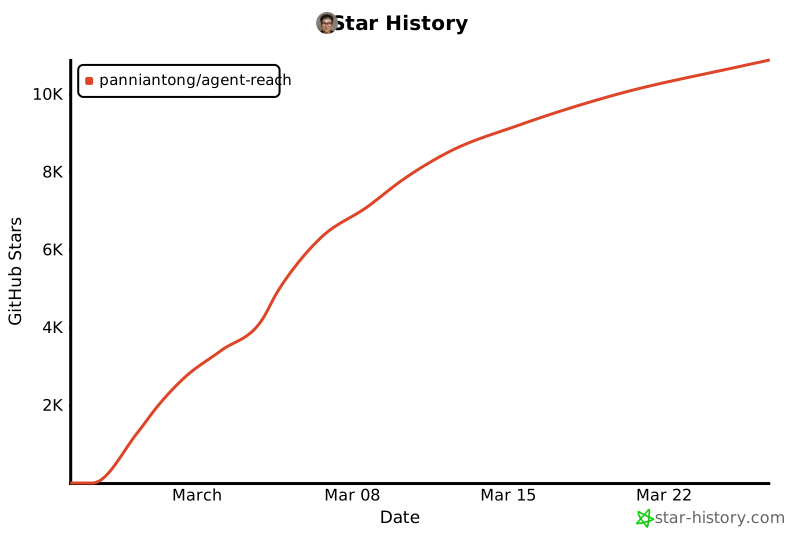](https://star-history.com/#Panniantong/Agent-Reach&Date)
|